
Stepper Motor Interfacing with 8051 Microcontroller (AT89C51) – Circuit Diagram & Source Code
Table of Contents
ToggleIntroduction
Stepper motor interfacing with 8051 microcontroller (AT89C51) is one of the most important and frequently asked embedded systems projects for engineering students. Stepper motors are mainly used where accurate position and speed control is required.
In this tutorial, you will learn how to interface a stepper motor with 8051, understand the working principle, ULN2003 driver circuit, and step-by-step control logic. This project is ideal for diploma, B.Tech, M.Tech, and embedded systems training students.
What is a Stepper Motor?
A stepper motor is an electromechanical device that converts electrical pulses into precise mechanical rotation. Each pulse moves the motor shaft by a fixed angle, making it ideal for precision control applications.
Key Features of Stepper Motor
High accuracy and repeatability
Precise angular movement
Open-loop control (no feedback required)
Easy to interface with microcontrollers
Why Use 8051 Microcontroller (AT89C51)?
The AT89C51 microcontroller is one of the most widely used controllers in academic and industrial training projects.
Features of AT89C51
8-bit microcontroller
4 KB Flash memory
128 bytes RAM
32 programmable I/O pins
Timer and interrupt support
Components Required
AT89C51 Microcontroller
Stepper Motor (Unipolar)
ULN2003 Driver IC
11.0592 MHz Crystal Oscillator
Capacitors (33pF)
5V DC Power Supply
Connecting wires and PCB/Breadboard
Why ULN2003 Driver IC is Used?
The 8051 microcontroller cannot drive a stepper motor directly due to current limitations. The ULN2003 IC acts as a current amplifier between the microcontroller and the stepper motor.
Advantages of ULN2003
High current driving capability
Built-in flyback diodes
Protects microcontroller from back EMF
Easy interface with 8051
Working Principle of Stepper Motor with 8051
The stepper motor rotates when its coils are energized in a specific sequence. The 8051 microcontroller sends control signals to the ULN2003 driver, which energizes the motor coils accordingly.
Changing the sequence → changes direction
Changing the delay → controls speed
Pin Configuration
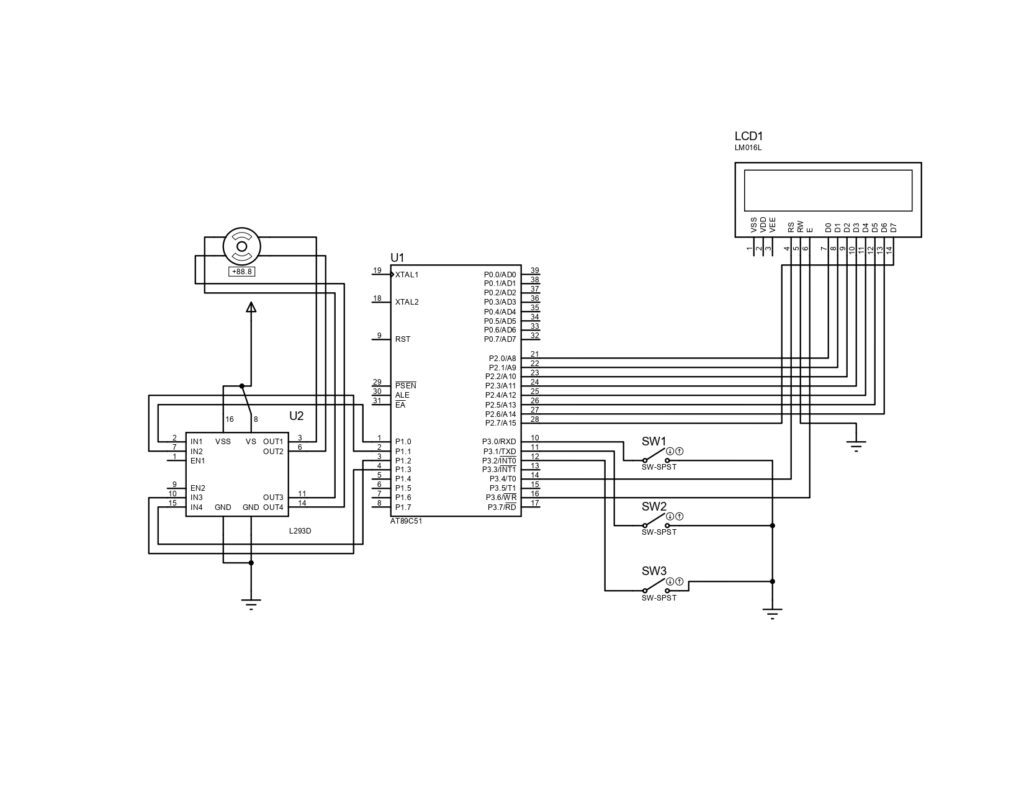
Port P2.0 – P2.3 → ULN2003 input pins
ULN2003 output pins → Stepper motor coils
Circuit Diagram of Stepper Motor Interfacing with 8051
Below is the circuit diagram for Stepper Motor Interfacing with AT89C51 Microcontroller.
Source Code for Stepper Motor Interfacing with 8051
The following program rotates the stepper motor using a full-step sequence.
#include<reg51.h>

#define lcd P2

sbit rs=P3^4;

sbit rw=P3^5;

sbit e=P3^6;


sbit sw1=P1^2;

sbit sw2=P1^1;

sbit sw3=P1^3;

sbit sw4=P1^0;


sbit forward = P3^0;

sbit backward = P3^1;

sbit stop = P3^2;


void delay (int);

void cmd (unsigned char);

void display (unsigned char);

void string (char *);

void init (void);


void delay (int d)

{

unsigned char i;

for(;d>0;d--)

{

for(i=250;i>0;i--);

for(i=248;i>0;i--);

}

}

void cmd (unsigned char c)

{

lcd=c;

rs=0;

e=1;

delay(10);

e=0;

}

void display (unsigned char c)

{

lcd=c;

rs=1;

e=1;

delay(10);

e=0;

}

void string (char *p)

{

while(*p)

{

display(*p++);

}

}

void init (void)

{

cmd(0x38);

cmd(0x0c);

cmd(0x01);

cmd(0x80);

}


void main()

{

int z=0;

init();

P3=0xff;

P1=0x00;

abc:

  cmd(0x80);

while(stop==0);

string("Press Forward Or");

cmd(0xc0);

string("Backward To Run");

forward=1;

backward=1;

while(1)

{

            if(forward==0)

{

              cmd(0x01);

cmd(0x80);

              string("Running Forward");

              while(forward==0);

while(1)

{

z++;

if(z==1)

{

sw1=1;sw2=0;sw3=0;sw4=0;delay(30);

                 if(backward==0 || stop==0)

                 break;

}

else if(z==2)

{

sw1=1;sw2=1;sw3=0;sw4=0;delay(30);

if(backward==0 || stop==0)

                 break;

}

else if(z==3)

{

sw1=0;sw2=1;sw3=0;sw4=0;delay(30);

if(backward==0 || stop==0)

                 break;

}

else if(z==4)

{

sw1=0;sw2=1;sw3=1;sw4=0;delay(30);

                 if(backward==0 || stop==0)

                 break;

}

else if(z==5)

{

   sw1=0;sw2=0;sw3=1;sw4=0;delay(30);

if(backward==0 || stop==0)

                 break;

}

else if(z==6)

{

sw1=0;sw2=0;sw3=1;sw4=1;delay(30);

if(backward==0 || stop==0)

                 break;

}

else if(z==7)

{

sw1=0;sw2=0;sw3=0;sw4=1;delay(30);

if(backward==0 || stop==0)

                 break;

}

else if(z==8)

{

z=0;

sw1=1;sw2=0;sw3=0;sw4=1;delay(30);

   if(backward==0 || stop==0)

                 break;

}

  }

}


            if(backward==0)

{

cmd(0x01);

cmd(0x80);

string("Running Backward");

              while(backward==0);

while(1)

{

z++;

if(z==1)

{

sw1=1;sw2=0;sw3=0;sw4=1;delay(30);

                 if(forward==0 || stop==0)

                 break;

}

else if(z==2)

{

sw1=0;sw2=0;sw3=0;sw4=1;delay(30);

if(forward==0 || stop==0)

                 break;

}

else if(z==3)

{

sw1=0;sw2=0;sw3=1;sw4=1;delay(30);

if(forward==0 || stop==0)

                 break;

}

else if(z==4)

{

sw1=0;sw2=0;sw3=1;sw4=0;delay(30);

                 if(forward==0 || stop==0)

                 break;

}

else if(z==5)

{

   sw1=0;sw2=1;sw3=1;sw4=0;delay(30);

if(forward==0 || stop==0)

                 break;

}

else if(z==6)

{

                 sw1=0;sw2=1;sw3=0;sw4=0;delay(30);

if(forward==0 || stop==0)

                 break;

}

else if(z==7)

{

sw1=1;sw2=1;sw3=0;sw4=0;delay(30);

if(forward==0 || stop==0)

                 break;

}

else if(z==8)

{

z=0;

sw1=1;sw2=0;sw3=0;sw4=0;delay(30);

     if(forward==0 || stop==0)

                 break;

}

  }

}

if(stop==0)

goto abc;

}

}
Algorithm
Initialize Port P2 as output
Send step sequence to motor coils
Provide suitable delay
Repeat sequence for continuous rotation
Applications of Stepper Motor with 8051
Robotics and automation systems
CNC machines
3D printers
Industrial control systems
Camera positioning systems
Advantages
High precision control
Simple hardware design
Low cost
Reliable operation
Conclusion
Stepper motor interfacing with 8051 microcontroller (AT89C51) is an essential embedded systems project that helps students understand motor control, driver circuits, and microcontroller programming. This project is highly recommended for academic practicals and final-year projects.
You can further enhance this project by adding:
LCD display
Direction control switch
Speed control using potentiometer

1 Response
[…] Previous story Stepper Motor Interfacing with 8051 Microcontroller (AT89C51) – Circuit Diagram & Source Code […]