
Description
HRM Software PHP and MySQL with eSSL Face Recognition Attendance Integration
Complete Human Resource Management System with Biometric Attendance
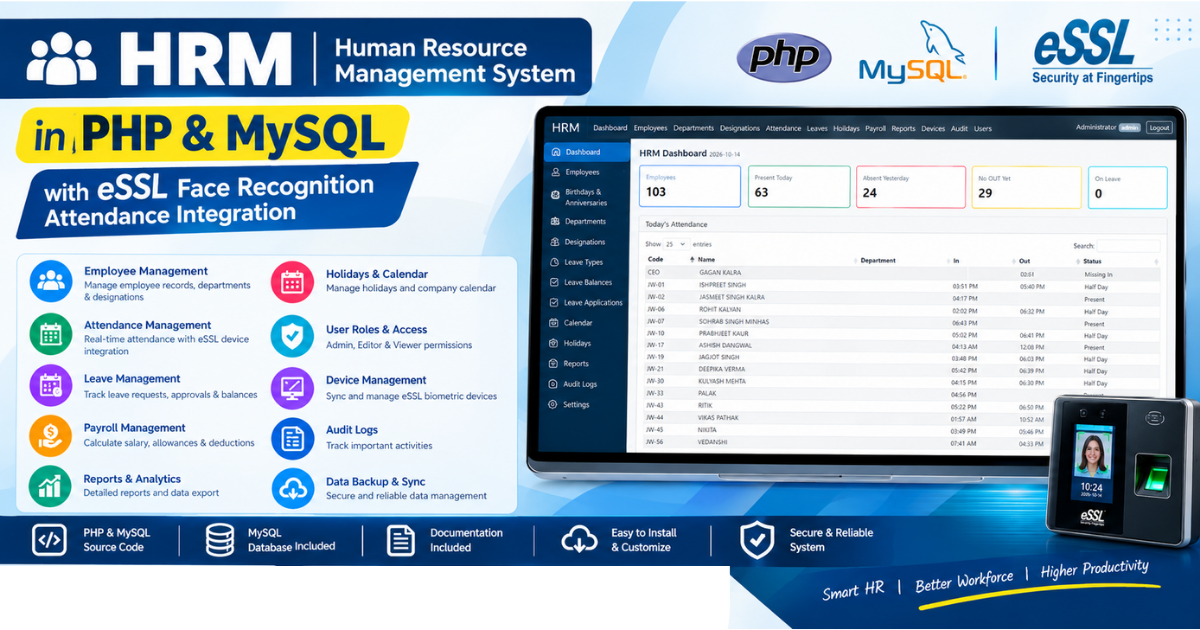
HRM Software in PHP and MySQL is a web-based Human Resource Management System developed to help businesses manage employees, attendance, leaves, payroll and HR operations through a centralized dashboard. Integrated with supported eSSL face-recognition attendance machines, this system brings biometric punch records and employee management together in one application.
This HRM Software in PHP and MySQL combines a PHP-based web interface, a MySQL database and a Python synchronization utility to transfer attendance records from connected eSSL devices into the HRM system. Administrators can monitor daily attendance, review IN and OUT times, process attendance, manage employee details and generate payroll reports.
The system is designed for organizations that want a practical employee management solution with biometric attendance integration and configurable HR workflows.
1. HRM Dashboard
The HRM dashboard provides a consolidated view of employee and attendance information. Administrators can quickly review important attendance statistics without opening multiple pages.
Dashboard highlights include:
- Total employees
- Present today
- Absent yesterday
- Employees with no OUT punch yet
- Employees on leave
- Today’s attendance table
- Employee codes and names
- Departments
- IN and OUT times
- Attendance status
The HRM Software in PHP and MySQL dashboard makes it easier to identify missing punches, review attendance activity and monitor employee availability.
2. eSSL Face Recognition Attendance Integration
One of the main features of this HRM solution is its integration with supported eSSL biometric attendance devices.
The system connects attendance machines to the HRM database through a synchronization utility. Attendance records are retrieved from the devices, stored in MySQL and processed for display in the HRM website.
Integration features include:
- Connection to configured eSSL devices
- Device online/offline status
- Attendance punch synchronization
- Employee user import from devices
- Employee details synchronization
- Device synchronization logs
- Manual synchronization controls
- Scheduled synchronization support
- Attendance processing after synchronization
Face and fingerprint enrollment is performed on the biometric device itself. The HRM software manages employee records and device synchronization; it does not capture a person’s face directly through the website.
Important: Confirm device compatibility and network configuration before installation. The supplied configuration is designed for the supported eSSL devices listed in the installation guide.
3. Employee Management
The employee management module allows administrators to maintain employee records in a centralized database.
Employee information can include:
- Employee code
- Employee name
- Department
- Designation
- Joining date
- Basic salary
- Allowances
- Employee status
- Related device user ID
The employee code must match the corresponding user ID on the biometric machine for correct attendance mapping.
When configured, administrators can add or update employee details in the HRM and synchronize relevant employee information with connected eSSL machines.
4. Attendance Management
The attendance module displays employee attendance records with IN and OUT times, attendance status and processed working-hour information.
Administrators can select a date range, review attendance records and process or recalculate attendance when required.
Attendance features include:
- Daily attendance records
- Employee-wise attendance
- IN and OUT punch times
- Present, absent and half-day statuses
- Missing IN identification
- Employees who have not punched OUT
- Net working hours
- Short working hours
- Overtime hours
- Attendance correction tools
- Date-wise attendance processing
The system calculates working time using recorded punches and configured rules. Its supplied default rule requires eight net working hours per day, subtracting recorded time spent outside. Attendance rules can be adjusted to suit organizational requirements.
5. Punch Log and Attendance Verification
The punch log provides access to the original attendance punches retrieved from the biometric machines.
Administrators can use the log to investigate attendance discrepancies, missing punches and incorrect IN/OUT times.
This feature helps HR staff compare processed attendance against original device records before finalizing attendance and payroll.
Original machine punches are retained when attendance records are manually corrected, supporting review and traceability.
6. Manual Attendance Correction
Sometimes employees forget to punch IN or OUT, or a device may be temporarily unavailable. The system includes an administrator-only attendance correction workflow for these cases.
Authorized administrators can enter corrected IN and OUT times, provide a reason and save the adjustment. The system recalculates relevant working-hour and attendance values.
Manual changes and reversions are recorded in the audit log. Original machine punches are not overwritten by the correction process.
7. Department Management
The HRM Software in PHP and MySQL includes department management for organizing employees according to the company’s structure.
Create and maintain departments such as:
- Human Resources
- Accounts and Finance
- Information Technology
- Sales and Marketing
- Administration
- Operations
Departments can be associated with employee records to support organized reporting and HR administration.
8. Designation Management
The designation module lets administrators maintain employee job titles and positions.
Examples include HR Executive, Software Developer, Accountant, Sales Executive, Team Leader, Manager and Administrator.
Employee designations can be managed alongside departments and other employee details.
9. Leave Management
The leave module provides tools for maintaining employee leave records and monitoring leave-related activity.
Depending on the configured workflow, HR staff can manage leave applications, review approval status and coordinate approved leave with attendance processing.
The system also includes holiday management, helping organizations maintain their holiday calendar and interpret attendance records appropriately.
10. Payroll Management
The payroll module uses employee salary details and processed attendance information to calculate payroll according to the configured rules.
Features include:
- Basic salary and allowances
- Monthly payroll generation
- Payroll recalculation
- Attendance-based deductions
- Unpaid leave deductions
- Half-day and absence calculations
- Overtime calculations
- Salary slip printing
The supplied payroll cycle runs from the 25th of the previous month through the 24th of the selected month by default. The cycle can be configured for a different start day.
Payroll calculations should be reviewed and configured for your organization’s salary policies before production use.
11. Holidays Management
Maintain organizational holidays through the holidays module. Holiday records can be considered during attendance processing and payroll calculations according to the system’s configured rules.
12. Reports and Data Export
The reporting module helps HR teams review employee and attendance information.
The system supports report printing and CSV/Excel-compatible exports where available, as well as printable salary slips.
Reports can help management review attendance trends, payroll information and employee records.
13. Device Management
The Devices section provides tools for monitoring and managing configured biometric machines.
Available functions include:
- Device connection status
- Last synchronization information
- Sync Now controls
- Import users from devices
- Push employees to devices
- Updating device user names
- Device synchronization troubleshooting
The software can be configured to synchronize attendance automatically using Windows Task Scheduler. A manual synchronization option is also available.
14. User Management and Access Roles
The HRM Software in PHP and MySQL supports separate user accounts and role-based access.
Admin: Can access all system modules, manage user accounts and view audit logs.
Editor: Can manage operational modules such as employees, attendance, leaves, payroll and devices, but cannot manage users or view the audit log.
Viewer: Has read-only access to permitted dashboard, attendance, employee, leave, holiday, report and device information. Payroll visibility is configurable.
Using separate accounts helps organizations control who can modify information and who can only view it.
15. Audit Logs
Audit logs record important administrative activities, including attendance corrections and reversions. This supports traceability when reviewing changes to employee or attendance information.
Access to the audit log is restricted according to the configured user roles.
16. Technology Stack
This HRM solution uses the following technologies:
- PHP for the web application
- MySQL for database storage
- Python for biometric synchronization
- HTML and CSS for the interface
- JavaScript for interactive functions
- XAMPP for local Windows deployment
The installation also uses the Python packages required for device communication and MySQL synchronization.
17. Installation Requirements
The supplied Windows installation guide describes the following setup:
- Windows 10 or Windows 11 server PC
- XAMPP with PHP 8.x, Apache and MySQL
- Python 3
- Required Python packages:
pyzkandmysql-connector-python - The included HRM project files
- The supplied SQL database schema
- Network access to compatible eSSL devices
- Configured device IP addresses and communication port
- Windows Task Scheduler for automatic synchronization, if required
The server PC must remain powered on and connected to the device network during the required attendance synchronization periods. Other authorized office computers can access the HRM website over the local network when network and firewall settings are configured correctly.
Follow the supplied installation guide for database setup, administrator creation, device configuration, synchronization and security settings.
18. Who Can Use This HRM Software?
This HRM software can be considered by:
- Small and medium-sized businesses
- Corporate offices
- HR departments
- IT companies
- Service organizations
- Offices using compatible biometric attendance devices
- Businesses seeking a customizable PHP and MySQL HRM system
Actual suitability depends on the supported eSSL device model, network configuration and the organization’s attendance and payroll policies.
19. What Is Included?
The digital project package can include the files supplied with the product:
- PHP HRM application source code
- MySQL database schema
- Python synchronization scripts
- Employee and attendance modules
- Payroll and leave modules
- Device management tools
- Installation guide
- Configuration instructions
Please check the final downloadable package for the exact included files and any additional documentation.
20. Frequently Asked Questions
What is HRM Software in PHP and MySQL?
It is a web-based Human Resource Management System for managing employee details, attendance, leaves, payroll, departments, holidays and HR reports using PHP and MySQL.
Does the HRM support eSSL face-recognition machines?
The supplied version is designed to synchronize attendance and employee information with its configured, supported eSSL devices. Confirm your exact model and network setup before installation.
Does the software capture faces through the website?
No. Employees enroll their face or fingerprint directly on the supported biometric machine. The software manages device users and attendance synchronization.
Can attendance synchronize automatically?
Yes. The supplied installation guide describes scheduled synchronization using Windows Task Scheduler, with a manual Sync Now option also available.
Does the system include payroll?
Yes. The system includes payroll generation, recalculation and salary slip printing based on employee salary details, processed attendance and configured payroll rules.
Can attendance records be corrected manually?
Yes. Authorized administrators can correct IN/OUT times with a reason. The system retains original machine punches and records manual changes in the audit log.
Can multiple office computers access the HRM?
Yes. The installation guide describes access from other computers on the same local network when the server IP, Apache service and firewall are configured correctly.
Which technologies are used?
The application uses PHP, MySQL, Python, HTML, CSS and JavaScript.
Is the source code included?
The product is intended to be supplied as a source-code package. Verify that the downloadable archive contains the application, SQL schema, synchronization scripts and installation guide before publishing this claim.
Product Demo:
Conclusion
HRM Software in PHP and MySQL with eSSL Face Recognition Attendance Integration brings employee management, biometric attendance, leave administration, payroll and reporting into one web-based system.
With device synchronization, attendance processing, employee records, access roles and audit logging, it provides a practical foundation for organizations seeking a customizable HRM solution using PHP and MySQL.
Related Product:
Reviews
There are no reviews yet.